Cyber threats against WordPress websites are growing more sophisticated every year. While most website owners are familiar with malware, fewer understand the dangers of stalkerware and other stealthy threats that can secretly monitor website activity, steal sensitive information, and eventually, erode customer trust.
If you run a business website, blog, or e-Commerce store on WordPress, protecting your site isn’t optional. It’s an essential part of managing an online business.
Without adequate site security, you’re putting your customers, brand reputation, and search rankings at risk every day.
In this guide, we’ll explain what stalkerware and malware are, how they infect WordPress websites, and provide practical steps you can take to keep your website secure.
Before we begin, here’s a checklist summarizing our tips for protecting your WP website that you can use before running a security audit:
| No. | Tip: |
| 1 | Keep Your WordPress Website Updated |
| 2 | Delete Unused Plugins and Themes |
| 3 | Use Strong Passwords and Two-Factor Authentication |
| 4 | Install a WP Firewall |
| 5 | Scan Your Website Regularly |
| 6 | Secure Your Website Hosting Environment |
| 7 | Monitor File Changes |
| 8 | Backup Your Site Daily |
| 9 | Restrict Login Attempts |
| 10 | Perform Regular Security Audits |
Why Are WordPress Sites Frequent Targets Of Cyber-Attacks?
To say that WordPress dominates the website market is an understatement.
Look at the chart below from WordPress:
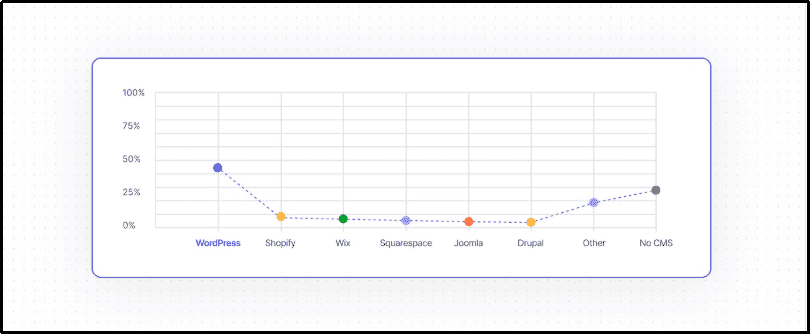
Let’s sum up the key stats about WordPress:
- 43% of websites are powered by WordPress.
- WordPress controls 61.4% of the Content Management System (CMS) websites on the Internet.
- 33% of e-Commerce sites run on WordPress-powered WooCommerce.
Cybercriminals are also aware of WP’s dominance. More websites, more targets.
Hackers have studied the structure of a WP website.
| Directory: | Purpose: |
| /wp-admin/ | Contains the WP administration dashboard and core administration files. |
| /wp-content/ | Stores user-generated content and extensions. |
| /wp-content/plugins/ | Stores installed plugins. |
| /wp-content/uploads/ | Stores uploaded media: images, PDFs, and videos. |
| /wp-includes/ | Contains WP core libraries, classes, and functions. |
Hackers know where the plugins and uploads are stored. They also know which files are commonly writable and which configurations are frequently misconfigured.
Predictability allows hackers to automate large-scale attacks.
WP Ghost estimates that 13,000 WP websites are hacked daily, totaling around 4.7 million websites per year.
What Is Stalkerware?
Stalkerware is a type of malicious software designed to secretly monitor activity and collect information without the owner’s consent.
While stalkerware is commonly associated with smartphones, similar spying scripts and backdoors can also infect websites.
What can stalkerware do to your WP website?
- Steal usernames and passwords.
- Monitor administration logins and activities.
- Steal customer and payment information.
- Track website traffic.
- Monitor visitor behavior.
- Create hidden administrator accounts for immediate access.
- Redirect visitors to fraudulent websites.
What makes stalkerware dangerous is its stealth.
Unlike ransomware or other forms of malware that immediately disrupt a website, stalkerware can operate quietly in the background.
It can remain undetected for weeks or months while continuously collecting valuable data and giving cybercriminals access to your website.
For business websites, the consequences of getting infiltrated by stalkerware can be severe. A hidden infection can cause data breaches that could result in lost customer trust, SEO penalties, blacklisting by search engines, and significant financial damage.
What Is Malware In WordPress?
Malware is any type of malicious software designed to damage, exploit, or gain unauthorized access to a website.
In WordPress, malware can infect files, databases, plugins, themes, or even the server itself, allowing the cybercriminals to steal data, manipulate content, or take control of the website.
Here is a list of common WordPress malware:
- Backdoor Scripts: Give attackers access to your website.
- SEO Spam Injections:Insert spammy links or pages to manipulate search rankings.
- Malicious Redirects: Send visitors to phishing sites, scams, or malware-infected pages.
- Phishing Pages:Designed to steal usernames, passwords, or financial information.
- Hidden Administrator Accounts:Created to maintain unauthorized access to your website.
- Credential Stealers:Capture login details and sensitive information.
- File Injectors: Insert malicious code into WP core files, plugins, or themes.
- Database Malware:Modifies website settings, content, or user data for malicious purposes.
💡Pro Tip: WordPress websites face a constant stream of automated attacks. It’s important to run regular plugin and software updates, malware scanning, and review authentication credentials to keep your website safe.
What Are The Differences Between Stalkerware And Malware?
While reading, you may have noticed that stalkerware and malware appear similar.
To clarify, Stalkerware is a subset of malware.
The main difference is the attacker’s goal.
Here’s a table differentiating stalkerware from malware:
| Stalkerware | Malware |
| A specific type of malware focused on surveillance. | A broad term for malicious software |
| Designed primarily to secretly monitor and collect information. | Designed to damage, disrupt, steal, extort, or gain website access. |
| Tries to remain hidden for a long time. | May announce itself through ransomware defacement or website disruption. |
| Goals include spying on users, administrators, or website activities. | Goals include financial gain, sabotage, spam, or data theft. |
On WP websites, infections are generally categorized as malware. However, some malware exhibits stalkerware-like behavior that is focused on surveillance and data collection.
The cybersecurity industry typically uses the term “stalkerware” for spyware installed on personal devices – such as phones, tablets, or computers – to monitor the user’s activities without their consent.
While stalkerware is traditionally associated with spying on personal devices, WordPress websites can also be infected by spyware and hidden backdoors that secretly monitor administrator activity, steal credentials, and collect confidential information.
These surveillance-focused threats share many characteristics with stalkerware, even though cybersecurity professionals usually classify them as spyware or information-stealing malware.
Thus, to differentiate malware, programs that perform stealthy and surveillance-type functions are referred to as stalkerware.
10 Ways To Protect Your WordPress Site From Stalkerware And Malware
A cyber attack is launched every 39 seconds.
As you’re reading this, automated bots may already be scanning your website for vulnerabilities they can exploit.
Worse, stalkerware remains hidden, silently monitoring your website and stealing sensitive information for weeks or months before it’s discovered.
The good news is that you don’t have to wait until your website is compromised to take action.
By implementing the right security measures today, you can significantly reduce your risk and keep your WP website, customer data, and brand reputation safe.
Here are 10 proven ways to protect your WP site from stalkerware and malware attacks.
The first one is non-negotiable.
1. Keep Your WordPress Website Updated
Keeping your WordPress website up to date is one of the simplest and most effective ways to protect it from stalkerware, malware, and other cyber threats.
You have to keep the following programs regularly updated:
- WordPress Core
- Plugins
- Themes
Outdated software presents vulnerabilities that malware can easily exploit. Once a vulnerability is discovered, hackers will launch automated attacks that scan the Internet for websites that haven’t installed the latest security patches.
Plugins deserve extra special attention.
Security researchers have consistently found that the vast majority of WP vulnerabilities originate from plugins rather than the WordPress core itself.
An outdated or abandoned plugin can provide attackers with an easy entry point to install malware, steal credentials, create hidden administrator accounts, or gain persistent access to your website.
An effective WP website updating program will require more than automatic updates.
Every WP update should be carefully reviewed to ensure compatibility with your plugins and themes, tested to prevent conflicts, and supported by performance checks and regular scans.
If the process is overwhelming, sign up for a Mountaintop Web Design WordPress Care Plan.
We take a proactive approach to website maintenance by managing updates, regularly monitoring for security threats, running daily site backups, and performing technical audits.
Focus on growing your business while we keep your WP website protected and running smoothly behind the scenes.
2. Delete Unused Plugins and Themes
Every plugin and theme installed on your WordPress website expands your potential attack surface – even if it’s inactive.
That’s why it’s not enough to deactivate software you no longer use. Unused plugins and themes should be completely removed to eliminate unnecessary security risks.
Make it a regular habit to delete:
- Old plugins that are no longer needed.
- Unused themes, especially outdated default themes.
- Abandoned plugins or themes that no longer receive updates.
- Pirated or nulled plugins and themes obtained from unofficial sources.
Inactive plugins can still contain vulnerabilities that hackers can exploit if the files remain on your server.
Likewise, abandoned software often stops receiving security patches, leaving known vulnerabilities exposed indefinitely.
Meanwhile, nulled or pirated plugins may be intentionally modified to include hidden backdoors, malware, spam scripts, or credential stealers that give cyber criminals unauthorized access to your website.
When it comes to WP security, less is more.
Keep only the plugins and themes you use and need, and ensure they come from reputable developers.
3. Use Strong Passwords and Two-Factor Authentication
No matter how secure your hosting provider or WordPress installation may be, weak passwords can undermine your entire security strategy,
Cybercriminals routinely use automated bots to launch brute-force attacks, attempting thousands of username-password combinations until they gain access to a website.
To strengthen your defenses, follow these password best practices:
- Use passwords that are at least 16 characters long.
- Combine uppercase and lowercase letters, numbers, and special characters.
- Avoid using names, birthdays, or easily guessed words.
- Never reuse passwords across multiple accounts.
- Store passwords securely using a reputable Password Manager.
In addition to having strong passwords, enable Two-Factor Authentication (2FA) for all administrator accounts.
With 2FA enabled, logging in requires a second form of verification, such as a code generated on your smartphone, even if your password has been compromised. This additional layer of security significantly reduces the risk of unauthorized access.
Strong passwords and 2FA may seem like small steps, but together they provide one of the most effective defenses against hackers attempting to gain access to your WP website.
4. Install a WP Firewall
A firewall is your website’s first line of defense.
Instead of waiting for malicious traffic to reach your WP installation, the firewall actively filters and blocks suspicious requests before they can exploit vulnerabilities or infect your website with malware.
A properly configured WordPress firewall can protect your website from the following attacks:
- SQL injections that install programs to manipulate your database.
- Cross-site Scripting (XSS) installs malicious scripts into your site.
- Malicious file uploads designed to install malware or backdoors.
- Directory traversal attacks that try to access sensitive files outside the web root.
- Local File Inclusion (LFI) exploits that abuse vulnerable scripts to execute unauthorized code.
- Brute-force login attempts aimed at guessing administrator usernames and passwords.
A firewall is automated and can block thousands of malicious requests without any action required from you.
While a firewall alone cannot guarantee complete security, it provides a critical layer of protection that can stop many attacks before they ever reach your website.
5. Scan Your Website Regularly
Regular website scanning helps identify stalkerware-type threats early.
What types of stalkerware can website scanning uncover?
- Hidden backdoors.
- Suspicious or unauthorized code.
- Malware signatures associated with common WP infections.
- Modifications done on core files, plugins, or themes.
- Blacklisting issues that can affect search rankings.
- Other security vulnerabilities.
Browser-based scanners are fine, but you can augment website security by adding server-side malware scanners that can inspect source code, files, and the database.
Remember, cybercriminals are trying to stay ahead of the good guys. They will frequently update their malware to avoid and evade detection.
If your website was declared “safe” yesterday, it could be infected tomorrow.
When combined with software updates, backups, and security monitoring, regular scans can identify and eliminate threats before they cause real damage to your website.
6. Secure Your Website Hosting Environment
Your hosting provider plays a critical role in protecting your website from malware. That’s why choosing a reputable host with strong built-in security measures should be a key part of your overall WP site protection strategy.
Here are features you should look for in a web host service provider:
- Malware scanning and detection threat.
- Web Application Firewall (WAF) protection.
- Automatic website backups (Very important!!!).
- 24/7 server monitoring.
- Server isolation between hosting accounts.
- DDoS (Distributed Denial of Service) protection.
- Regular server security updates and patch management.
- SSL certificates and encrypted connections.
Selecting a low-quality shared hosting arrangement can result in risky account isolation.
What do we mean?
A security breach on one website can potentially affect other websites that are sharing the same server. Attackers may move laterally and target other websites hosted on the same platform.
In comparison, reputable hosting providers use account isolation, containerization, and other security controls to minimize the risk of infections from spreading to other customers.
They also actively monitor their infrastructure for suspicious activity, helping detect and stop threats before they impact your website.
💡Pro Tip: Invest in secure, well-managed hosting providers. They will significantly reduce your exposure to malware, stalkerware, and other cyber threats while providing greater peace of mind for your business.
7. Monitor File Changes
After gaining access, attackers might inject malicious code into existing files to create backdoors, steal data, redirect visitors, or maintain continued access to your website.
Files that are frequently targeted by attackers include:
- php
- wp-config.php
- php
- .htaccess
- Core WordPress files
- Plugin and theme files
A single line of malicious code may be enough to compromise your website, yet remain hidden in view for months.
File monitoring is effective because it can identify potential modifications before they’re activated and infect your website. It’s another layer of defense that can protect your website, your customers, and your business brand.
8. Backup Your Site Daily
An automatic backup is a backup of your website that’s conducted on a scheduled basis without requiring any manual action from you.
The backup system automatically creates and stores copies of the following files:
- WordPress files
- Themes and plugins
- Media uploads
- Database
- Configuration files
The files can be stored in cloud storage services, dedicated backup servers, remote data centers, or managed hosting backup systems.
Automatic backups can be scheduled daily, hourly, or weekly.
We recommend daily backups for most business websites and hourly backups for eCommerce sites. If your website isn’t particularly active or stores many assets such as customer information, text, images, and video content, a weekly backup should suffice.
Regular backups are important because if the hosting server becomes infected, our files/assets remain safe.
If your website went down on Wednesday but had an automatic backup on Tuesday, you can restore the files from 24 hours earlier. Your website will be back up and running in no time.
Imagine if your last backup was six months ago?
9. Restrict Login Attempts
Your WordPress login page is a common target of cybercriminals.
Without proper protections in place, an automated bot can launch a brute-force attack, steal your username and password combinations, and gain unmitigated access to your website.
To reduce the risk of unauthorized logins, implement the following measures:
- Restrict failed login attempts.
- Restrict login retries.
- Disable or secure XML-RPC, a remote communication protocol built into WP that allows external applications and services to interact with your website.
- Restrict administrator access by IP address.
- Monitor login activity.
By restricting the number of failed login attempts and retries, you stop automated attacks before they can test thousands of username and password combinations.
Combining restricting login attempts with 2FA will discourage cybercriminals from forcing their way into your website.
💡Pro Tip: What’s a good number of attempts? We recommend no more than five retries before locking out the user.
10. Perform Regular Security Audits
One of the biggest mistakes website owners make is assuming that their website is secure because it appears to be functioning normally.
A compromised website may continue to perform normally even while attackers are:
- Injecting SEO spam into hidden pages.
- Stealing customer data.
- Hiding malicious code within the database.
- Creating unauthorized accounts.
- Installing backdoors.
- Monitoring website activity.
A comprehensive WP website audit goes beyond routine updates and malware scans.
For example, our WordPress care plan will inspect your website’s files, database, user accounts, plugins, themes, hosting environment, and security configurations for signs of vulnerabilities.
Think of a security audit as a preventive health check. You want to find the symptoms before they become a full-blown disease.
Conclusion
Protecting your WordPress website from stalkerware and malware isn’t just an IT concern – it’s a business necessity.
Cybercriminals are constantly looking for weak passwords, outdated plugins, and unprotected websites. With a proactive approach to cybersecurity, you can prevent malware and stalkerware from infiltrating your website, stealing confidential information, and damaging your reputation.
Use the checklist we provided at the beginning of this article as your guide for running a regular website security audit. Don’t wait until your website has been compromised before taking cybersecurity seriously.
|
Focus on Your Business. We’ll Protect Your Website. Security isn’t something you should have to manage alone. Whether you need malware removal, website maintenance, backups, security backups, or a professionally built website with security in mind, Mountaintop Web Design can help. Our team specializes in building fast, secure, SEO-friendly WordPress websites that are protected against modern threats while helping your business grow online. Don’t wait for a malware infection to damage your rankings and reputation. Contact us today and get the peace of mind you need to focus on your business. |
Frequently Asked Questions (FAQs)
1. What is the biggest cause of WordPress malware?
Outdated plugins and themes are among the leading causes of WordPress compromises. Weak passwords and pirated plugins also significantly increase risk.
2. Can malware hurt my SEO?
Yes. Malware can result in the following inconveniences that could hurt your SEO:
- Google penalties
- Create spam pages
- Trigger browser warnings
- Reduce rankings
- Damage your online reputation
3. How often should I scan my website?
We recommend daily scanning of your website because attacks happen on a daily basis. Site backups are particularly important. For e-Commerce sites, we recommend hourly scans as these types of websites are more active.